
Stratum Frontier Available for demos
Get every vehicle frontline-ready faster.
Know what every vehicle needs next, who owns the work and what is holding it up. Bring intake, recon, approvals, parts and photos into one workflow, from arrival to ready-to-list.
- Inspect
- Repair
- Detail
- Photos
- List
Explore the working product in a guided demo. We’ll review your workflow, current capabilities and fit before you make a decision.
Frontier in 30 seconds
What does this vehicle need next, who is responsible, and why is it still sitting?
Owners, managers, and employees can all see the answer.
See the work behind every ready-to-list vehicle.
Follow a vehicle from intake to inspection, approval, parts and photos. Keep the next task, its owner and the work still waiting in view. Real Frontier screens · Demo data
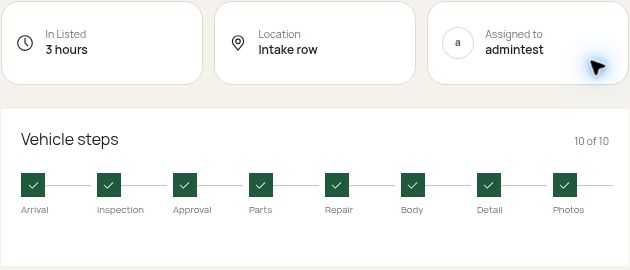
Keep the stage and owner visible.
Workflow stages, location and assigned owner together on a demo vehicle record.
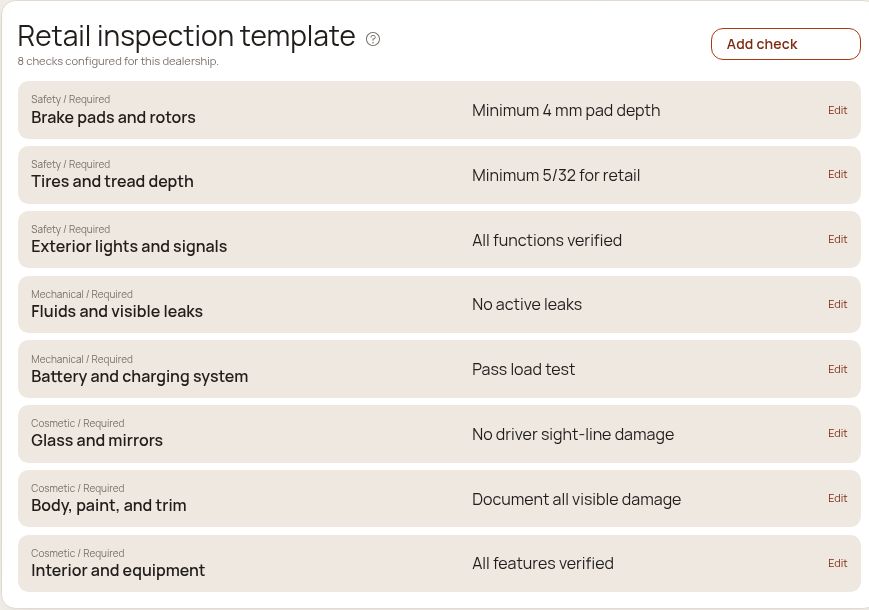
Give every inspection a clear checklist.
Configurable retail inspection checks in the demo workspace. Template view shown; this is not a completed inspection.
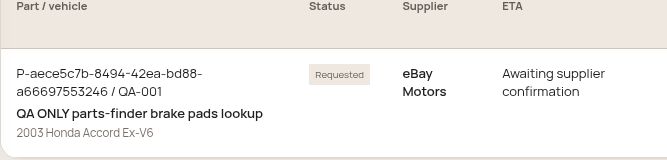
Keep parts requests in the workflow.
A synthetic internal request shows its status and supplier-confirmation step. The supplier label does not imply live stock or automatic ordering.
Screens captured from Frontier with synthetic demo data. These are product views, not customer results. English-language interface shown.
Where does it
go next?
A missing part. An approval. The final photos. Explore three sample vehicles to see the task, the owner, and the reason each one is waiting.
Three vehicles. Three next steps.
Choose a sample record to explore its handoff.
Fictional records. Changes stay in this browser example.
2022 Toyota Camry
DetailComplete interior detail
Detail is waiting for an available bay.
The example needs JavaScript to switch vehicles and complete tasks.
Illustrative workflow, sample costs and waiting times. This is not a live dealership dashboard or a customer result.
Fewer blind spots. Better decisions about every day in stock.
Frontier gives your team the information to act on delays. The financial value comes from what your dealership does with that visibility.
Find the wait
See current vehicle age and the next task. Prioritize vehicles waiting for an inspection, a decision, a part or the final photos.
Keep spending visible
Review requested work and recorded recon costs with the vehicle, so approval decisions have context.
Create room for the next sale
Getting a vehicle ready sooner can reduce holding exposure and give your sales team more time to market it. Results depend on your operation.
Start with the measures you can act on
- Current vehicle age
- How long has this vehicle been in inventory?
- Next task and owner
- Who can move it forward now?
- Approval and parts status
- What decision or item is it waiting for?
- Readiness and recorded cost
- What work remains before it is ready to list?
From arrival to listing readiness.
A vehicle moves forward when the next piece of work gets done. Keep inspections, approval decisions, parts, photos and ownership connected along the way.
- Intake
- Inspect
- Approve
- Parts + repair
- Photos
- Ready to list
Your team still controls each decision. Listing readiness does not mean automatic publication to outside marketplaces.
See what Frontier does today.
Intake, CSV import and scheduled inventory feeds, recon tasks, approvals, parts, photos, a vendor portal, recall screening, vehicle location and time-to-line reporting with history by stage and rooftop. The demo is the best place to check your store’s specific workflow.
Keep your DMS. Give the work around each vehicle a home.
Start with manual entry or a CSV import, then schedule the inventory export your DMS already produces (HTTPS or SFTP) so new units arrive on their own. No DMS integration project is needed for a demo.
Tell us how your store runs
Direct DMS API connections are set up with each dealer group and its DMS provider. Bring your DMS name and how you track recon today, and we will map it in the demo.
What could fewer waiting days be worth?
Try your own assumptions. This holding-cost model is an estimate, not a promise of savings or profit.
Vehicles per month × days saved × daily holding cost
The starting numbers are illustrative, not a benchmark or customer result. Use one daily holding-cost figure; do not add the same cost again as missed profit. This model excludes taxes, setup, labor changes and sales opportunity. Actual results vary.
Enter valid non-negative numbers. Vehicles must be a whole number. Fill all required fields.
Estimated monthly reduction in holding exposure
Estimated amount after software cost
Holding-cost-only ROI
Put your next handoff on screen.
Bring your process to the conversation. See how your team could use Frontier from intake to ready-to-list.
Prefer email? contact@stratumscale.com